How file systems work
Explore files, directories, allocation methods, free-space management, and disk scheduling.
Read the Korean original on Velog ↗English translation
Saving and reopening files is so familiar that the underlying work is easy to overlook. Even a single read requires the operating system to check permissions, locate disk blocks, and track a position in the file. Here is a closer look at those familiar operations from inside the file system.
Files
A file is a logical unit of persistent storage, typically represented as a sequence of bytes. Documents, programs, images, and videos are all stored as files.
File operations
Common operations include creating, deleting, reading, writing, renaming, moving, and modifying files.
Opening a file
Opening a file prepares access to its contents and metadata.
File pointer
The file pointer tracks the current offset. As a file is read or written sequentially, the pointer advances to the next position.
Open count
An open count tracks how many times a file is currently open. Multiple processes or threads may open the same file, subject to the operating system's access and sharing rules.
Disk location
The operating system and file system use location information to find a file's data blocks. These storage details are generally hidden from users and applications.
Access permissions
Opening a file involves checking the caller's permissions. Read, write, and execute permissions can differ between users.
File types
Different kinds of files serve different purposes and require suitable applications to handle them.
Executables
Contain compiled program code that can run as a program or command.
Source code
Contains a program's source, usually as text.
Archives
Combine multiple files or directories into one file.
Images
Store visual information such as photographs, artwork, and graphics.
File access methods
The appropriate access method depends on the file and how it will be used.
Sequential access
Data is read or written in order. Reaching a later position requires reading or skipping the data before it.
Direct access
Data can be read or written at a specified position without first traversing the entire file. This supports efficient access to individual records or regions.
Disks
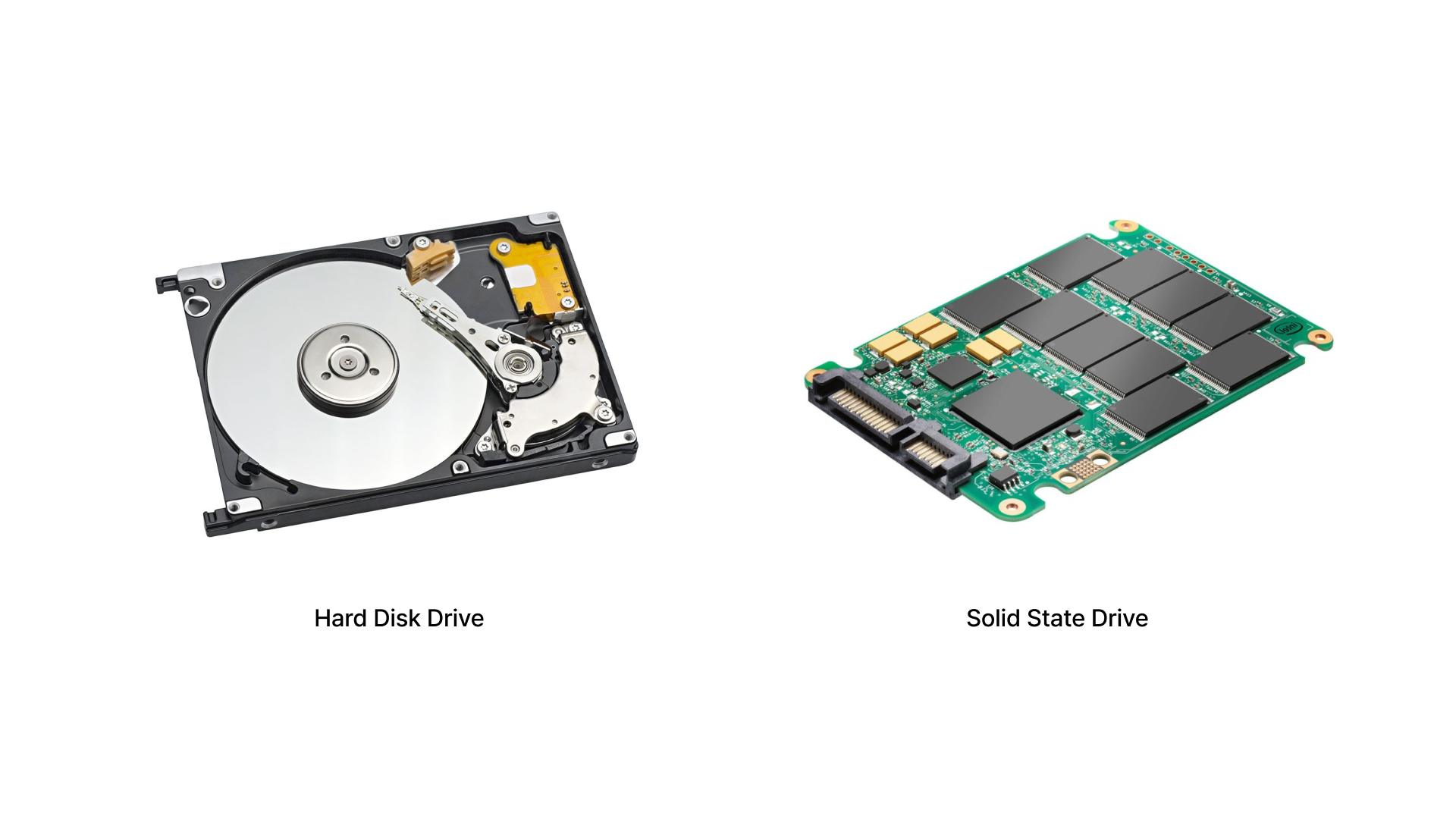
Storage devices include hard disk drives (HDDs) and solid-state drives (SSDs). They can be formatted with file systems such as NTFS, ext4, or APFS.
Hard disk drives
An HDD stores data on rotating platters and accesses it with a moving head. Its mechanical parts make it slower than an SSD in many workloads and more sensitive to physical shocks.
Solid-state drives
An SSD stores data in flash memory. It has no moving parts, generally offers faster access, and is less vulnerable to mechanical shock.
Partitions
Partitioning divides a physical disk into separate regions that can be managed independently.
File system
Formatting a partition with a file system gives the operating system a structure for storing and accessing data.
Data area
Stores user data and file-system metadata. Its organization depends on the file system.
Swap area
Swap provides disk space for memory pages that do not need to remain in RAM, freeing physical memory for other work.
Raw device access
A raw device interface allows direct access to a disk or partition without going through a file system.
File systems
A file system organizes data, manages storage space, and provides an interface for applications. Examples include NTFS on Windows, ext4 on Linux, APFS on macOS, FAT32, and exFAT.
File-system structure
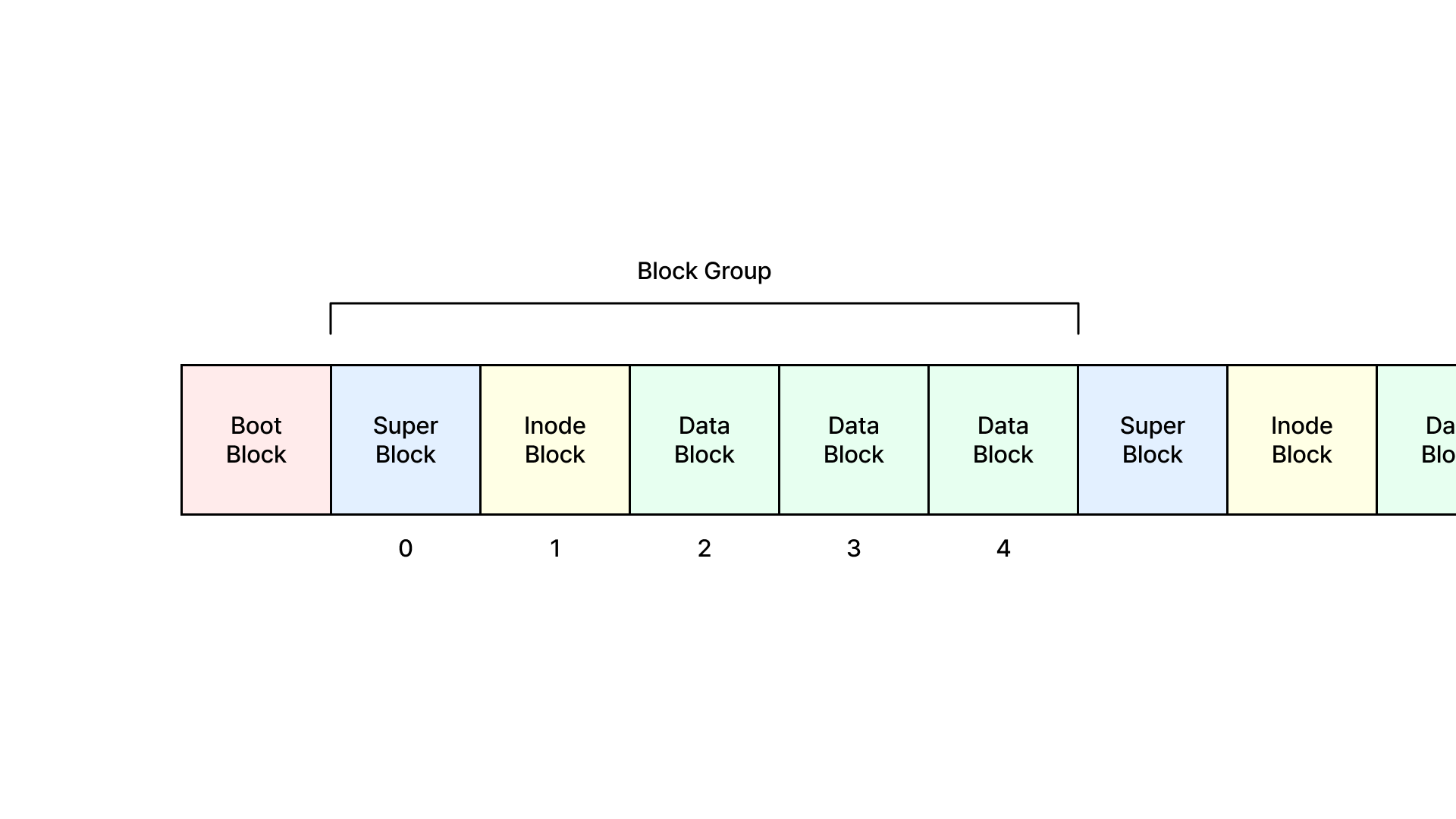
Implementations differ, but many file systems use some version of the following structures.
Boot block
A boot area can hold initialization or bootloader code used when starting a system.
Superblock
Stores information about the file system as a whole, such as its size, block size, free and used blocks, and mount state.
Inode
An inode stores metadata for a file or directory, including its size, timestamps, permissions, and references to its data blocks.
Data blocks
Hold the actual file contents. The file system manages these blocks when storing and retrieving data.
Journaling A journal records changes so the file system can recover more efficiently after an unexpected interruption.
Mounting and implementation
Mounting makes a storage device's file system available to the operating system.
Mount point
A mounted file system is attached at a directory called a mount point. Users access it through that directory.
File-system implementation
Much of the implementation runs in the kernel, providing persistent storage and efficient access to data.
File control blocks
A file control block (FCB) stores the attributes and metadata needed to manage a file. An inode serves this role in Unix-style file systems. This information supports access control, block lookup, and file operations.
File identifier
Identifies the file; Unix systems commonly use an inode number.
File size
The number of bytes stored in the file.
File location
References the file's data blocks, directly or through other structures.
Access permissions
Describe allowed operations. Unix permissions distinguish the owner, group, and other users.
Timestamps
Record times associated with the file, such as modification and last access.
Owner and group
Identify the file's owner and associated group.
Link count
Tracks the number of hard links referring to the file in a Unix file system.
Working with files
Reading and writing are the main ways applications access and modify stored data.
Opening
The system looks up metadata, such as the FCB, and prepares the file for use.
Reading
A read transfers data from the file into a memory buffer. It begins at the current offset associated with the open file, then advances that offset by the number of bytes read. Reading continues until the requested amount is retrieved or the end of the file is reached.
Writing
A write transfers data from memory into the file and advances the current offset. Writing can increase the file's size when the file is not restricted to a fixed length.
Closing
Closing releases the resources associated with the open file and removes that open reference from the system's tracking structures.
Directories
Directories organize files and subdirectories by storing their names and references to their metadata.
Directory entries
An entry pairs a name with a reference, such as an inode number, that identifies the corresponding file or directory.
Directory lookup
A linear search checks entries one by one. A hash-based lookup uses the file name to locate the relevant entry more directly.
Resolving paths
An absolute path, such as /home/user/documents/file.txt, starts at the root. A relative path, such as ./documents/file.txt, starts from the current directory.
Virtual file system
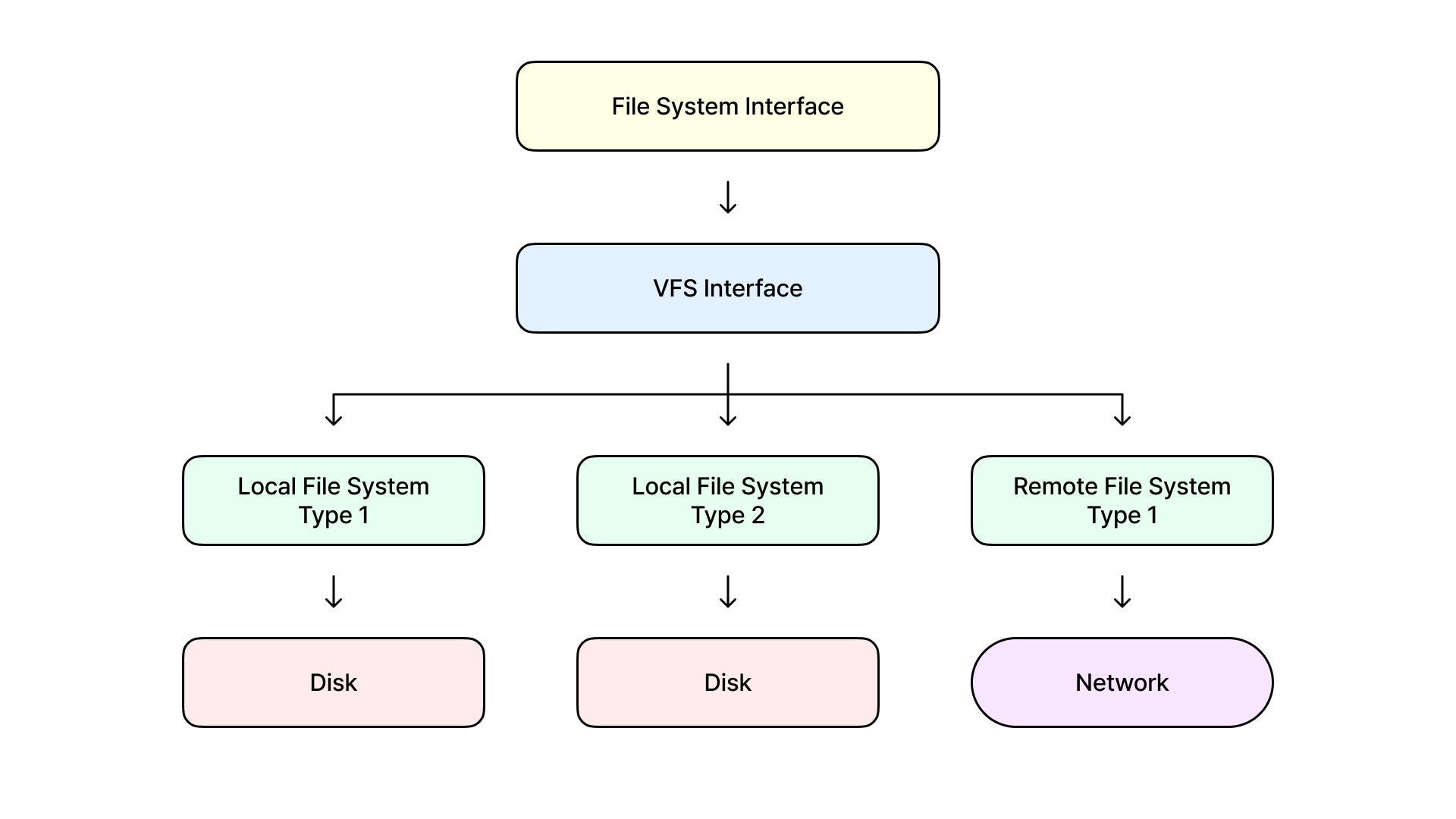
The virtual file system (VFS) is a kernel abstraction that exposes different file systems through a common interface. Applications can access files and directories consistently without handling every underlying format themselves.
Abstraction
A shared interface allows the operating system to perform common operations across different file systems.
Dynamic mounting
The VFS supports attaching additional file systems while the system is running.
File allocation methods
Allocation methods determine how file data occupies disk blocks, balancing access speed, space use, and implementation complexity.
Contiguous allocation
A file occupies consecutive blocks. Access is fast and the structure is simple, but fragmentation and file growth can be difficult to manage.
Linked allocation
Each block contains a reference to the next. Files can grow without requiring contiguous space, but random access is slower and damaged links can break the chain.
Indexed allocation
An index block stores pointers to a file's data blocks. This improves direct access, but adds overhead for small files and limits file size when only one index block is available. Multilevel indexing extends the scheme by allowing index blocks to refer to other index blocks.
Combined allocation
Unix-style inodes combine direct and indirect block pointers. Small files can use direct pointers; larger files use indirect structures to address more blocks.
Free-space management
The file system must track which blocks are available for allocation.
Bitmaps
One bit represents the state of each block. Bitmaps make it straightforward to identify runs of free blocks, but large maps consume memory and may require extensive scanning.
Linked lists
Free blocks form a linked list, with each entry pointing to another available block. The structure is simple, but searching for a suitable set of blocks can be slow.
Grouping
A block stores references to a group of free blocks. This allows several free-block addresses to be retrieved together, at the cost of maintaining those groups.
Counting
A free run is represented by its starting block and length. This is efficient for contiguous free space, but less compact when space is highly fragmented.
Disk scheduling
For disks with moving heads, scheduling aims to reduce head travel and improve I/O efficiency and response time.
First come, first served
FCFS handles requests in arrival order, which can cause unnecessary head movement.
Shortest seek time first
SSTF handles the request nearest the current head position. A steady stream of nearby requests can leave distant ones waiting, causing starvation.
SCAN
The head services requests while moving in one direction, then reverses at the end. This is also called the elevator algorithm.
C-SCAN
The head services requests in one direction, then returns to the opposite end to begin another pass. This provides more uniform waiting times.
LOOK and C-LOOK
These follow the ideas of SCAN and C-SCAN, but travel only as far as the outermost pending requests rather than to the physical ends of the disk.